- Have any Query
- (303) 807-1061
- doug@servohydraulicsolutions.com

Public Education & Museum Earthquake Simulators: Safety Interlocks, Payload Limits & Cost-Effective COTS Builds

Geotechnical Shake Tables & Laminar Shear Containers: Specifying Actuators for Soil-Structure & Centrifuge Labs
November 19, 2026
Phased Lab Expansion: How to Specify a Uniaxial Shake Table Today That Upgrades to Biaxial Testing Later
November 19, 2026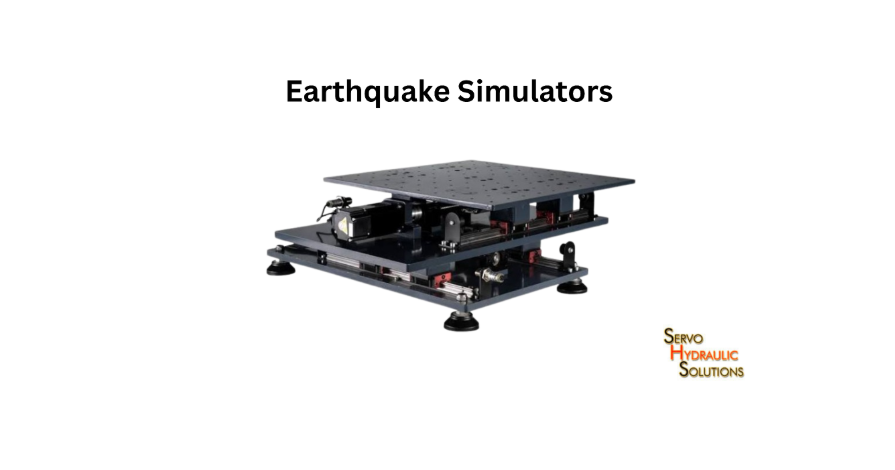
An earthquake table simulator gives museums, universities, and science centres a practical way to demonstrate how earthquake motion affects buildings, structures, and everyday objects. For public use, the best system isn’t simply one that shakes strongly; it must combine clear demonstrations, controlled motion, suitable payload capacity, reliable safety interlocks, and durable construction.
A well-designed simulator can let visitors compare how different building models respond to the same movement, while helping students understand seismic design. The challenge is making the experience engaging without turning an educational exhibit into an uncontrolled mechanical attraction.
What Is a Museum Earthquake Simulator?
A museum earthquake simulator is an interactive shake table that reproduces controlled, earthquake-like movement for educational demonstrations. Visitors can observe how structures respond to shaking, compare different building designs, and learn why features such as bracing, foundations, and structural stiffness matter.
Unlike specialist research equipment, a public simulator is designed around visitor interaction, straightforward operation, repeatable demonstrations, and safety. It may use an electric or servo-hydraulic drive system depending on its size, motion requirements, operating frequency, and budget.
A typical installation includes:
- A moving platform or tabletop.
- A drive mechanism and supporting frame.
- A motion controller with selectable demonstration profiles.
- Model mounting points or specimen fixtures.
- Physical guards and access restrictions.
- Emergency stop and safety interlock circuits.
- Operator controls and visitor instructions.
The design should begin with the educational objective. A small tabletop system for school groups has very different requirements from a large exhibit where visitors stand on a moving platform.
How an Interactive Shake Table Works
An interactive shake table moves a platform according to a selected motion profile. Small building models, blocks, or other demonstration objects are secured to the platform and subjected to controlled movement.
For example, a museum educator might place two building models on the table: one with a simple frame and another with additional diagonal bracing. The operator selects a demonstration profile, starts the movement, and visitors observe how the models respond.
The demonstration can introduce concepts such as:
- Ground acceleration and structural response.
- Natural frequency and resonance.
- Structural stiffness.
- Damping and energy dissipation.
- The effect of building height and mass.
- The importance of seismic-resistant design.
The table should have controlled operating modes rather than allowing visitors to select arbitrary movement settings. This makes demonstrations more consistent and reduces the chance of unexpected operation.
Difference Between Museum and Laboratory Shake Tables
A laboratory shake table is generally designed for engineering research, product qualification, or scientific testing. A museum simulator is designed primarily for safe, understandable public demonstrations.
| Feature | Museum earthquake simulator | Laboratory shake table |
| Main purpose | Public education and interaction | Research and testing |
| Operation | Preset demonstration profiles | Detailed programmable test signals |
| Payload | Models and approved exhibit objects | Engineering specimens |
| Controls | Simplified operator interface | Advanced control and data acquisition |
| Safety | Visitor access and guarding are central | Laboratory-specific operating safeguards |
| Duty cycle | Repeated public demonstrations | Test-dependent operating schedules |
| Measurement | Often visual and educational | Precision measurement and analysis |
A museum system does not need every capability found in a high-performance engineering facility. Paying for advanced research features that the exhibit will never use can increase project cost without improving the visitor experience.
When a Public Earthquake Simulator Is Needed
A public earthquake simulator is useful when an organisation wants visitors to experience a controlled demonstration of earthquake effects rather than read about them.
Common applications include:
- Science and technology museums.
- Earthquake awareness exhibitions.
- University engineering outreach programmes.
- School science laboratories.
- Disaster preparedness education centres.
- Public engineering events and mobile demonstrations.
It can also support classroom activities. Students might change the height or bracing of a model and observe how its behaviour changes under the same input motion.
The key is to connect the movement to a clear learning outcome. Shaking a platform without explaining what visitors are seeing may be entertaining, but it does not necessarily teach much.
Types of Public Earthquake Simulators
Not every educational organisation needs a large interactive installation. The right format depends on visitor numbers, available floor space, supervision, budget, and expected participation.
Tabletop Interactive Shake Tables
Tabletop simulators are compact systems designed for small building models and classroom demonstrations.
They are suitable for:
- School workshops.
- University demonstrations.
- Small museum exhibits.
- Portable education programmes.
- Comparing model-building designs.
Their smaller footprint makes installation easier, and they generally require less elaborate visitor access control than walk-on systems. The table should still have guarded moving parts, secure model mounting, and a clearly defined operating area.
Exhibit-Embedded Demonstration Tables
An exhibit-embedded table is integrated into a larger display, cabinet, or educational installation.
For example, a museum may build a display showing how different structural designs respond to an earthquake. The shake table sits inside the exhibit, with transparent protective panels and labelled model positions.
This format can include:
- Interactive screens.
- Model storage compartments.
- Pre-programmed demonstrations.
- Visual explanations of seismic concepts.
- Operator access behind a secured panel.
The exhibit furniture should allow maintenance access without exposing visitors to moving mechanical components.
Walk-On Earthquake Experience Platforms
Walk-on platforms are larger installations designed to let visitors experience controlled movement while standing on a platform.
These systems require a much more demanding safety assessment than tabletop models. Designers must consider visitor weight, balance, falls, platform movement, entry and exit arrangements, emergency stopping, and supervision.
A walk-on simulator should not be treated as an enlarged tabletop exhibit. It is a people-carrying moving platform and needs an appropriate engineering risk assessment, structural design, safeguarding, and applicable regulatory review.
University Outreach Shake Tables
University outreach shake tables are used for demonstrations at open days, engineering workshops, school visits, and public engagement events.
They often need to balance portability, repeated operation, simple controls, and the ability to demonstrate several structural concepts.
A useful outreach setup may include interchangeable building models, preset motion profiles, and a simple explanation panel. The equipment should be robust enough for frequent use and straightforward for trained staff to operate.
Choosing the Right Exhibit Format
Before selecting a format, consider the following:
| Requirement | Suitable format |
| Small classroom demonstrations | Tabletop simulator |
| Permanent museum display | Exhibit-embedded table |
| Visitor standing experience | Walk-on platform |
| Mobile university demonstrations | Portable outreach table |
| Comparing building models | Tabletop or exhibit-embedded system |
The most expensive format is not automatically the most educational. A compact table with well-designed models and clear explanations can deliver a stronger learning experience than a large platform with limited educational content.
Museum Interactive Shake Table Specifications
Museum interactive shake table specifications should describe how the equipment will operate in its actual exhibit environment. Table dimensions, payload, motion, duty cycle, and visitor access all influence the final design.
Table Size and Visitor Capacity
For a tabletop simulator, the platform must accommodate the planned building models, fixtures, and safety clearances.
A larger platform can support several models at once, but it also increases moving mass and may require a stronger drive system. The exhibit should leave enough room for visitors to observe the demonstration without crowding the operator.
For walk-on systems, visitor capacity must be defined by an engineering assessment. It should account for the permitted number of occupants, combined mass, weight distribution, platform dimensions, and movement conditions.
Never assume that a platform’s physical area alone determines its safe visitor capacity.
Payload Limits for Models and Props
Payload includes everything the moving platform carries.
For a tabletop system, this may include:
- Building models.
- Mounting fixtures.
- Display objects.
- Sensors and accessories.
- Removable demonstration components.
The supplier should specify maximum payload, permitted load distribution, mounting arrangements, and any centre-of-gravity restrictions.
A lightweight but very tall model can create different dynamic demands than a short, heavy model. Payload specifications should therefore include both mass and geometry.
Motion Profile and Intensity Control
A public simulator should use controlled and repeatable motion profiles. These might represent different educational scenarios, such as gentle shaking, stronger shaking, or a comparison of how structures respond to different input patterns.
The operator should be able to select approved profiles without changing engineering settings during a live demonstration.
Useful control features include:
- Preset motion programmes.
- Adjustable demonstration duration within approved limits.
- Controlled acceleration and displacement.
- Smooth start and stop sequences.
- Operator-only access to configuration settings.
- Fault detection and safe shutdown.
The system should not be marketed as reproducing a specific earthquake accurately unless the motion has been validated against the relevant record and the intended scaling conditions.
Frequency Range and Displacement Limits
Frequency and displacement determine how the platform moves.
A low-frequency movement may require more displacement to produce a given acceleration than a high-frequency movement. The system must therefore be designed around its intended motion profiles rather than a single maximum acceleration figure.
For sinusoidal motion:
[
a=(2\pi f)^2x
]
Where:
- (a) = acceleration amplitude.
- (f) = frequency.
- (x) = displacement amplitude.
This relationship is useful for preliminary engineering checks. Actual earthquake-like profiles are more complex and should be assessed using their complete time histories.
The platform should also have physical or controller-based motion limits to prevent travel beyond the approved operating envelope.
Duty Cycle and Daily Operation
Museum equipment may operate repeatedly throughout the day, sometimes with only short intervals between demonstrations.
The supplier should understand the expected operating schedule, including:
- Demonstrations per hour.
- Typical movement duration.
- Rest periods between cycles.
- Operating days per year.
- Expected service life.
- Environmental conditions.
The drive system, bearings, controller, and mechanical connections should be selected for the expected duty. A system designed for occasional laboratory demonstrations may not suit continuous public operation without modification.
Safe Public Seismic Demonstration Tables
Safety must be part of the initial design, not something added after the table has been built. A public exhibit may be used by children, older visitors, school groups, and people unfamiliar with moving machinery.
Safe public seismic demonstration tables need physical protection, controlled operation, clear supervision arrangements, and dependable shutdown systems.
Guardrails, Barriers, and Fall Protection
Moving parts should be separated from visitor access. For tabletop systems, this can involve fixed guards, transparent covers, or enclosed exhibit cabinets.
For larger platforms, barriers should prevent visitors from entering hazardous areas during operation. Walk-on installations need additional measures to prevent falls and uncontrolled entry or exit.
The guarding design should consider:
- Access to moving joints and linkages.
- Pinch and crush points.
- Reach-through openings.
- Falling demonstration objects.
- Safe visitor positioning.
- Emergency access for staff.
Transparent guards can be useful because visitors can see the mechanism without touching it.
Emergency Stop and Operator Controls
The trained operator should be able to reach the emergency stop easily, and it should be clearly identified.
Activating it should trigger the designed safe-stop response and prevent further hazardous movement. The exact stopping behaviour depends on the drive system and risk assessment.
Controls should distinguish between normal operation and emergency intervention. A visitor-facing start button, if provided, should only initiate a pre-approved sequence when the system is confirmed safe to operate.
Safety Interlocks and Access Control
Interlocks prevent operation when a defined safety condition is not satisfied.
For example, an enclosed tabletop simulator may use an access-door interlock that prevents movement while the guard is open. A larger installation may use gate monitoring to ensure visitors cannot enter the operating area during a demonstration.
Important design considerations include:
- Guard and door status monitoring.
- Prevention of unexpected restart.
- Operator authorisation.
- Safe response to sensor faults.
- Emergency stop monitoring.
- Controlled reset procedures.
Design and validate safety-related controls according to applicable machinery safety standards and the system’s risk assessment. A standard PLC or ordinary software command should not automatically be assumed to provide a safety-rated function.
Motion Limits and Visitor Safety
The permitted movement should be defined around the educational purpose and the people who may use the exhibit.
For tabletop models, this means controlling displacement, acceleration, speed, and demonstration duration so that models remain secure and the platform operates within its design limits.
For walk-on platforms, the risk assessment must also address balance, falls, occupant movement, handholds where appropriate, and safe entry and exit.
Do not define a universal safe acceleration for all visitors. Acceptable levels depend on platform design, movement direction, duration, user population, restraints or supports, and the applicable safety assessment.
Supervision and Staff Training
Even a well-guarded simulator needs clear operating procedures.
Staff should know how to:
- Inspect the platform before opening.
- Check guards and interlocks.
- Secure models and props.
- Select approved motion profiles.
- Start and stop demonstrations.
- Respond to faults and emergency stops.
- Keep visitors outside restricted areas.
- Record maintenance and inspection issues.
A short, practical operating checklist is often more useful than a lengthy manual that staff rarely consult.
COTS Earthquake Simulator Safety Interlocks
A COTS earthquake simulator is built using commercially available off-the-shelf components and established engineering assemblies rather than designing every part from scratch.
A COTS approach can reduce development time and simplify replacement of standard components. However, it does not mean that safety can be assumed from the individual components. The complete installation still needs system-level risk assessment and validation.
What Is a COTS Earthquake Simulator?
COTS stands for Commercial Off-The-Shelf. A COTS simulator may use standard motors, actuators, controllers, sensors, bearings, safety switches, and electrical components.
The manufacturer integrates these parts into a complete shake table system designed for a defined application.
The benefits can include:
- More readily available replacement components.
- Reduced custom engineering for standard functions.
- Easier maintenance planning.
- Potentially shorter procurement lead times.
- More predictable component documentation.
Custom engineering may still be necessary for the frame, platform, guarding, fixtures, and exhibit integration.
Essential Safety Interlocks for Public Use
The interlock arrangement should follow the machine’s risk assessment. Depending on the installation, important functions may include:
| Safety function | Purpose |
| Guard-door interlock | Prevents operation with a protective guard open |
| Emergency stop | Initiates the designed emergency stopping response |
| Access-gate monitoring | Controls access to restricted operating areas |
| Overtravel monitoring | Detects movement beyond permitted limits |
| Fault monitoring | Detects defined system faults |
| Restart prevention | Prevents unexpected movement after power restoration |
| Operator enable control | Restricts operation to authorised staff |
The required safety performance level or integrity level should be determined through the applicable risk assessment and machinery safety standards, not selected arbitrarily.
Emergency Stop and Power Isolation
Emergency stopping and electrical isolation are related but different functions.
An emergency stop is intended to bring the machine to a safe condition when a hazardous situation occurs. Power isolation is used to disconnect energy sources for maintenance or servicing.
A maintenance procedure should address electrical energy, stored hydraulic pressure, mechanical movement, and any other hazardous energy sources.
Staff must not assume that pressing an emergency stop makes the machine safe to service.
Door, Gate, and Access Interlocks
Access interlocks are particularly important where visitors could reach moving components.
A guarded enclosure may use a monitored switch that detects when a door is opened. A larger exhibit may require gate monitoring and a defined reset process.
The design should prevent a person from bypassing an interlock during normal operation. Resetting the system should not automatically initiate movement; a separate deliberate start command should be required after the operating area is confirmed safe.
Motion Envelope and Fault Monitoring
The motion envelope defines the platform’s permitted operating limits.
Monitoring may include:
- Position and displacement limits.
- Drive or actuator faults.
- Abnormal vibration or movement.
- Overload conditions.
- Temperature or pressure limits where relevant.
- Controller and sensor faults.
The response to each fault should be defined. Some conditions may require a controlled stop, while others may require a more immediate safety response.
Testing and Maintenance of Safety Systems
Test interlocks during commissioning and at planned intervals. Maintenance staff should follow documented procedures rather than relying on a quick visual check.
A practical safety verification programme should include:
- Inspecting guards and mechanical protection.
- Testing emergency stop functions.
- Checking door and gate interlocks.
- Confirming restart prevention.
- Verifying motion limit responses.
- Reviewing fault logs.
- Recording results and corrective actions.
The inspection frequency should follow the manufacturer’s instructions, risk assessment, operating environment, and applicable regulations.
University Outreach Earthquake Simulator Pricing
The cost of a university outreach earthquake simulator depends on its size, motion capability, drive system, payload, control equipment, safety design, and installation requirements.
A compact tabletop simulator can be significantly less expensive than a custom walk-on platform. However, comparing prices without comparing the included safety and support features can be misleading.
What Affects Outreach Shake Table Cost?
The main cost drivers include:
- Platform dimensions and payload capacity.
- Electric or servo-hydraulic drive system.
- Required acceleration, displacement, and frequency range.
- Motion controller and operator interface.
- Safety guards and interlocks.
- Exhibit furniture and display integration.
- Instrumentation and demonstration models.
- Installation, commissioning, and training.
A larger payload or more demanding motion profile may require a stronger frame, drive, and supporting structure.
COTS Build Pricing Ranges
No dependable universal price range exists for all COTS earthquake simulators. Suppliers may quote different configurations, and prices can vary by country, component selection, safety requirements, and customisation.
For budgeting, separate the project into three broad levels:
| Configuration | Typical scope | Main cost considerations |
| Basic tabletop system | Compact platform, preset movement, simple controls | Drive, frame, basic guarding |
| Enhanced museum or outreach system | Larger platform, interchangeable models, operator interface, integrated safety | Controls, guarding, exhibit furniture, commissioning |
| Custom walk-on installation | People-carrying platform, engineered access and protection, specialised controls | Structural design, safety engineering, installation, validation |
Treat these as configuration categories, not supplier quotations. Request itemised pricing based on a common specification before setting a final budget.
Custom Museum Exhibit Pricing
Custom exhibits may include display cabinets, interactive screens, graphics, lighting, model storage, visitor barriers, and integrated control panels.
The mechanical simulator may be only one part of the overall project. Exhibit design and fabrication can represent a substantial share of the budget, especially when the equipment must fit into an existing gallery.
A custom installation is justified when the visitor experience or building layout requires features that standard equipment cannot provide.
Hidden Costs Beyond the Simulator Price
The initial purchase price does not always include the full cost of operating the exhibit.
Remember to budget for:
- Shipping and installation.
- Electrical and building modifications.
- Foundations or floor reinforcement where required.
- Safety assessment and validation.
- Staff training.
- Spare parts and replacement models.
- Periodic inspection and maintenance.
- Software support and future upgrades.
For a public installation, ongoing support is particularly important. A simulator that is out of service for several weeks can disrupt an entire exhibition programme.
How to Compare Supplier Quotations
Use the same technical and operational specification for every supplier.
Ask each supplier to identify:
- Included drive and control equipment.
- Payload and motion limits.
- Safety interlocks and guarding.
- Operating duty cycle.
- Installation requirements.
- Commissioning and safety validation scope.
- Warranty and maintenance support.
- Spare parts availability.
Also ask for a demonstration or acceptance test where practical. The system should be assessed under representative payload and operating conditions.
How to Build a Cost-Effective COTS Simulator
A cost-effective simulator is not necessarily the one with the lowest purchase price. It provides the required educational experience without unnecessary complexity and remains safe and maintainable throughout its service life.
Define the Visitor Experience First
Decide what visitors should learn and how they will interact with the equipment.
Will they compare two building models? Observe resonance? Learn about structural bracing? Will they experience different earthquake intensities through a demonstration?
These decisions determine the platform size, motion profiles, models, controls, and exhibit layout.
Select the Right Table Size and Payload
Choose the smallest platform that comfortably supports the intended models and fixtures.
Oversizing can increase moving mass, drive requirements, and cost. Undersizing can restrict demonstrations and make the exhibit difficult to use.
Define maximum payload, mounting locations, centre-of-gravity limits, and permitted model dimensions before requesting quotations.
Use Standardised Safety Interlocks
Where appropriate, use established industrial safety components with suitable ratings and documentation.
Standardised safety switches, emergency stop devices, and monitored control arrangements can simplify replacement and maintenance. The complete safety circuit still needs to be engineered and validated for the application.
Design Durable Exhibit Furniture
Public exhibits receive frequent use, and visitors may not always handle equipment gently.
Use robust enclosures, protected controls, accessible service panels, and replaceable model fixtures. Keep cables and mechanical components out of visitor reach.
A well-designed exhibit should also make routine inspection straightforward.
Plan for Maintenance and Future Upgrades
Select components with available documentation and a realistic replacement path.
Plan for routine checks, spare parts, software support, and staff training. If the exhibit may later include new models or demonstrations, allow for suitable mounting points and control flexibility.
This approach helps avoid rebuilding the entire simulator when the educational programme changes.
Conclusion
A museum earthquake simulator should combine engaging demonstrations with controlled motion, suitable payload limits, durable construction, and validated safety interlocks. Whether using a tabletop, exhibit-embedded, or walk-on COTS system, define the visitor experience, safety requirements, and maintenance needs before purchasing to achieve cost-effective public education. To explore engineered custom shake tables or complete testing systems tailored to your facility’s space and safety goals, reach out to our team for a project-specific consultation.
Frequently Asked Questions
What Is an Earthquake Table Simulator?
An earthquake table simulator is a moving platform that reproduces controlled earthquake-like motion. It is used to demonstrate how buildings, structures, and objects respond to shaking.
Are Museum Earthquake Simulators Safe for Children?
They can be designed for supervised public use, including children’s demonstrations, when appropriate guarding, motion limits, access controls, and safety procedures are provided. The design must be assessed for the intended age group and type of interaction.
What Safety Interlocks Should a Public Shake Table Have?
Depending on the design, a public shake table may need emergency stops, guard-door or access-gate interlocks, motion limit monitoring, fault detection, and restart prevention. The final safety functions should be determined by a documented risk assessment.
How Much Payload Can a Museum Shake Table Handle?
Payload capacity depends on the frame, drive system, moving platform, mounting arrangement, and motion profile. Suppliers should specify the permitted total mass, load distribution, and centre-of-gravity limits.
What Is the Difference Between a Museum and Laboratory Shake Table?
A museum shake table is designed for repeatable public demonstrations and simplified operation. A laboratory shake table is generally designed for engineering research, detailed motion control, and measurement-intensive testing.
How Much Does a University Outreach Earthquake Simulator Cost?
The cost depends on platform size, payload, drive technology, motion capability, safety features, and exhibit integration. A reliable budget requires an itemised quotation based on the intended demonstration and operating conditions.
What Is a COTS Earthquake Simulator?
A COTS earthquake simulator uses commercially available components such as standard drives, actuators, controllers, sensors, and safety devices. These components are integrated into a complete system designed for the required educational application.
Can Visitors Stand on an Earthquake Simulator?
Visitors should only stand on a platform specifically designed and assessed for people-carrying operation. A tabletop or model-testing shake table must never be treated as a walk-on platform.
What Motion Intensity Is Safe for Public Demonstrations?
No single acceleration value is universally safe for every public simulator. Engineering assessment must establish permitted motion by considering platform design, duration, direction, visitor population, access arrangements, and applicable safety requirements.
Planning a Museum Exhibit or University Outreach Shake Table?
Whether you need a compact tabletop model demonstrator, an exhibit-embedded display, or a custom COTS motion platform with engineered safety interlocks, our team can help scope a safe and reliable build.