- Have any Query
- (303) 807-1061
- doug@servohydraulicsolutions.com

Replacing Legacy Windows XP Test Computers & Proprietary Software Without Losing Historical Calibration Data

OEM ReNew Packages vs Independent COTS Retrofits: Cost, Lead Time & Vendor Lock-In Comparison
November 20, 2026
Existing Servo Hydraulic Maintenance, Troubleshooting & Field Service Guide: When to Repair vs Rebuild
November 20, 2026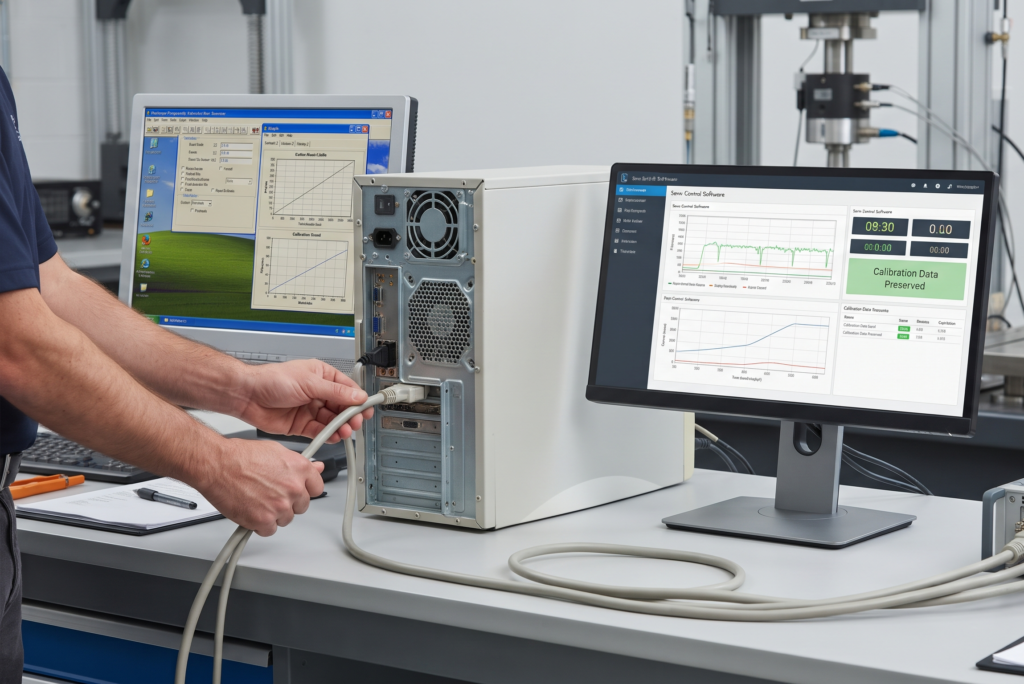
A legacy Windows XP test computer can often be replaced without losing the test methods, measurement records and historical calibration information stored on the original system. A carefully planned hydraulic system software upgrade can move the laboratory to a supported computing environment, introduce modern data acquisition and retain suitable existing control hardware, provided the old data and system configuration are backed up and validated before migration.
The biggest mistake is treating this as a simple computer replacement. Older test controllers may rely on proprietary software, hardware drivers, communication cards and calibration files that are no longer supported. The upgrade must preserve the relationship between the machine, its sensors, control settings and historical test records.
Why Upgrade Hydraulic System Software?
Many hydraulic testing laboratories still operate machines controlled by computers installed years ago. These systems may still perform their original tasks, but maintaining them becomes increasingly difficult as operating systems, software, and hardware interfaces age.
Replacing the computer is only one part of the job. The goal is to maintain reliable machine operation while improving software support, data handling and long-term maintainability.
Common Problems With Legacy Windows XP Test Controllers
Windows XP-based test controllers can face several practical issues:
- Unsupported operating system and security updates.
- Older computers with failing hard drives or power supplies.
- Proprietary software that cannot be installed on modern computers.
- Discontinued communication and data acquisition cards.
- Missing installation media or software license information.
- Limited connectivity with modern laboratory networks.
- Difficulty exporting test data into current file formats.
One common complication is that the test software may depend on a specific hardware card or driver. Copying the program folder to a new computer will not necessarily make it work.
Some systems also rely on older database formats, configuration files or operating-system components. These dependencies need to be identified before migration.
Risks of Continuing With Obsolete Software
Keeping a Windows XP test computer in operation can create reliability and cybersecurity concerns.
Hardware failure: Older computers and storage devices can fail without much warning. Without a usable backup, recovering the original configuration may be difficult.
Security exposure: Windows XP no longer receives normal security support. Connecting an unsupported computer to a modern network can introduce unnecessary risk.
Software incompatibility: New operating systems may not support the original application, drivers or communication hardware.
Data access problems: Historical results may be stored in proprietary databases or outdated formats that are difficult to open on current computers.
Limited maintenance options: Finding technicians familiar with the original software and hardware can become increasingly challenging.
The answer is not necessarily to discard the complete controller. A properly isolated legacy computer may still be useful during a transition, particularly for retrieving historical records and verifying the old configuration.
Benefits of a Modern Software Upgrade
A well-planned upgrade can improve several aspects of laboratory operation:
- Better compatibility with supported computers and operating systems.
- Improved test data storage and export.
- More maintainable software and hardware interfaces.
- Easier integration with modern DAQ systems.
- Improved backup and recovery arrangements.
- Better reporting and test record management.
- Reduced dependence on ageing computer hardware.
For example, a laboratory may retain its existing hydraulic actuator and servo valve while replacing the old computer, controller interface and data acquisition software. Where discontinued valve amplifiers or obsolete rig electronics are also an issue, upgrading legacy hydraulic actuator test stands with COTS parts can extend service life further without requiring a complete mechanical replacement.
When a Software-Only Upgrade Is Enough
A software-only upgrade may be suitable when the existing controller hardware remains functional and can communicate with the new software.
It is worth considering when:
- The controller has supported communication interfaces.
- Existing drivers are available for the target operating system.
- The control hardware meets the required performance.
- Sensor and valve interfaces remain compatible.
- The original software configuration can be transferred or recreated.
- Safety functions can be maintained and validated.
If the controller depends on obsolete hardware that cannot communicate with a modern computer, a software update alone will not solve the problem.
Migrating Legacy Windows XP Test Controller Software
Migrating legacy Windows XP test controller software requires more planning than installing an application on a new computer. Older systems often combine software, hardware drivers, control settings and measurement configurations that must work together.
How Legacy Windows XP Test Controllers Work
A typical older test controller uses a computer to run the operating software and communicate with control hardware.
The system may include:
- A Windows XP computer running proprietary test software.
- Communication cards or interface modules.
- Controller hardware that processes test commands.
- Analogue and digital input/output channels.
- Sensors measuring force, displacement or pressure.
- A servo valve interface controlling hydraulic movement.
- Software for test configuration, monitoring and data recording.
During a test, the software sends commands through the controller hardware. The controller processes feedback and manages the control output to the hydraulic system.
The exact arrangement varies by machine. Some systems perform real-time control within dedicated controller hardware, while others rely on specific computer-based components. This distinction matters when planning the migration.
What Can Be Migrated From a Legacy System?
Depending on the original software and file formats, several items may be transferred:
- Test methods and templates.
- User-defined test sequences.
- Historical test records.
- Calibration certificates and records.
- Sensor scaling information.
- Controller configuration files.
- Channel names and measurement settings.
- Reporting templates.
- User and equipment identification records.
Whether you can migrate each item depends on whether the original software allows export and whether the replacement platform supports the same data structure.
Before starting, make a complete inventory of the files and settings that the laboratory needs to retain.
What Cannot Be Directly Migrated?
Some elements may require conversion or reconstruction.
These can include:
- Proprietary database files.
- Unsupported driver packages.
- Hardware-specific configuration files.
- Software licenses tied to the original computer.
- Old communication-card settings.
- Test sequences using discontinued software functions.
- Calibration records stored in undocumented formats.
A file that can be copied is not necessarily a file that can be used by the new application.
For instance, an old test method may contain channel scaling or control settings that do not map directly to the replacement controller. You may need to recreate the method and check it against the original records.
Windows XP to Windows 10/11 Migration Steps
Windows XP applications do not automatically become compatible with Windows 10 or Windows 11. Compatibility depends on the software architecture, drivers, hardware interfaces and licensing arrangements.
A controlled migration should follow these steps:
- Document the original system
Record the computer model, operating system, software version, controller hardware, communication cards and connected devices.
- Create complete backups
Back up the application, configuration files, databases, test methods and available calibration records. Keep an original copy separate from the working migration files.
- Identify software dependencies
Check required drivers, libraries, communication protocols, license keys and hardware requirements.
- Confirm the target platform
Verify that the replacement software and interface hardware support the intended Windows version. Do not assume that compatibility mode will resolve every issue.
- Migrate data separately
Transfer historical records into a controlled archive or supported database format. Keep the original files unchanged.
- Recreate and verify test methods
Check control modes, sensor scaling, channel assignments and operating limits before using migrated test methods.
- Validate the complete system
Test communication, data recording, control response and safety functions under controlled conditions.
Common Migration Challenges and Solutions
| Challenge | Practical approach |
| Unsupported drivers | Identify compatible replacement interfaces or controller hardware |
| Proprietary databases | Export, convert or archive the original records |
| Missing software licenses | Confirm transfer rights and license recovery options |
| Hardware communication problems | Test the interface before full installation |
| Incompatible test methods | Recreate and verify methods against original documentation |
| Missing calibration settings | Recover records and verify sensor configuration |
| Different operating-system behaviour | Test the complete application on the target platform |
A useful precaution is to keep the original Windows XP computer available in a controlled, isolated environment until the new system has been verified. It can serve as a reference for retrieving old records or checking historical settings.
When a Full Controller Replacement Is Needed
A complete controller replacement may be necessary when:
- The original controller hardware is no longer functional.
- Communication cards cannot be supported on modern computers.
- Required drivers are unavailable.
- The control hardware cannot meet the laboratory’s performance requirements.
- The software cannot be migrated or maintained.
- The existing system has undocumented interfaces that cannot be reliably supported.
In this situation, the project should include new control hardware—such as modern COTS digital controllers for ageing test stands—compatible software and properly engineered sensor and valve interfaces.
Modern Data Acquisition for Old Shake Tables
Older earthquake simulation shake tables and hydraulic test stands may have functioning mechanical systems but limited data recording capabilities. A modern DAQ upgrade can improve measurement collection, storage and analysis without automatically requiring replacement of the complete machine.
How Modern DAQ Improves Old Shake Tables
A data acquisition system collects signals from sensors and converts them into digital measurements that can be displayed, recorded and analysed.
Modern DAQ equipment can provide:
- More flexible measurement channel configuration.
- Improved data storage and export.
- Time-synchronised measurement recording.
- Easier integration with analysis software.
- Better channel identification and monitoring.
- More convenient access to historical test results.
For a shake table, useful measurement channels may include table acceleration, displacement, actuator position, hydraulic pressure and specimen response.
The required sampling rate and measurement range depend on the test frequency, sensor characteristics and research objectives. Select a DAQ system based on these requirements rather than simply choosing the unit with the most channels.
What Sensors Can Be Retained During a DAQ Upgrade?
Existing sensors may be reused if they are in good condition and compatible with the replacement acquisition hardware.
Potentially reusable devices include:
- Accelerometers.
- Displacement transducers.
- Load cells.
- Pressure transducers.
- Strain gauges.
- Extensometers.
Before reuse, check the sensor’s output type, measurement range, sensitivity, excitation requirements and calibration status.
For example, an accelerometer may provide a suitable signal for the new DAQ, but its power or signal-conditioning requirements may differ from those of the original acquisition system.
What Sensors Usually Need Replacement?
Replacement may be necessary when sensors are damaged, unstable, poorly documented or incompatible with the new equipment.
Common reasons include:
- Failed or intermittent output.
- Unavailable cables or connectors.
- Unsuitable measurement range.
- Excessive noise.
- Expired or unreliable calibration.
- Unsupported signal-conditioning requirements.
Do not automatically replace every old sensor. If a device remains accurate, documented and compatible, retaining it may reduce cost and avoid unnecessary changes to the measurement setup.
Matching DAQ Channels to Test Requirements
A DAQ specification should begin with the measurements required by the test programme.
| Measurement | Possible sensor | Key selection consideration |
| Table acceleration | Accelerometer | Range, sensitivity and frequency response |
| Displacement | LVDT or other displacement sensor | Stroke and resolution |
| Force | Load cell | Capacity and accuracy |
| Hydraulic pressure | Pressure transducer | Pressure range and compatibility |
| Strain | Strain gauge | Signal conditioning and bridge configuration |
| Specimen response | Application-specific sensor | Required measurement range and bandwidth |
The channel count should include all required measurements and reasonable provision for future expansion.
Sampling rate, resolution, filtering and synchronisation also matter. A high channel count does not guarantee suitable measurement quality.
Integrating Modern DAQ With Legacy Controllers
Modern DAQ hardware may operate alongside an existing controller if suitable interfaces are available.
For example, the controller may continue managing the hydraulic control loop while a separate DAQ system records additional specimen measurements.
Integration requires attention to:
- Signal type and voltage range.
- Sensor excitation.
- Grounding and shielding.
- Channel synchronisation.
- Sampling configuration.
- Data time stamps.
- Electrical isolation where required.
A separate DAQ system should not interfere with the controller’s feedback signals or real-time operation. The control and measurement architectures need to be clearly defined.
When a Full DAQ Replacement Is Needed
A complete DAQ replacement may be appropriate when the original acquisition hardware has failed, cannot support the required sampling rates or no longer has suitable software and drivers.
It may also be needed when the laboratory wants to record additional channels, improve synchronisation or establish a modern data management process.
The replacement should be validated using known signal sources and suitable measurement checks before being used for important research or qualification tests.
Open-Architecture Servo Control Software
Open-architecture servo control software can provide laboratories with more flexibility when modernizing older hydraulic test systems. It can reduce dependence on a single proprietary environment, but engineers still need to design the control hardware and software as a complete system.
What Is Open-Architecture Servo Control Software?
Open-architecture software uses documented interfaces and configurable components to communicate with suitable control hardware.
Depending on the platform, it may support:
- Configurable control channels.
- Standard industrial communication interfaces.
- Data acquisition integration.
- Custom test sequences.
- Data export.
- Integration with third-party sensors and devices.
Open architecture does not mean that every controller, servo valve or software application can connect without modification. Compatibility must be established at the signal, hardware and software levels.
Benefits of Open-Architecture Systems
Potential advantages include:
Hardware flexibility: The laboratory may have more choice when selecting supported controller and DAQ components.
Data accessibility: Open or documented data formats can make it easier to transfer results between applications.
Simpler maintenance planning: Standard interfaces may allow multiple qualified suppliers to support the system.
Future expansion: Additional measurement channels or software functions may be easier to integrate.
Reduced proprietary dependence: The laboratory can avoid unnecessary reliance on a single supplier for every modification.
Limitations of Open-Architecture Systems
An open system still requires specialist engineering.
Potential challenges include:
- Custom interface development.
- Control-loop configuration.
- Hardware compatibility checks.
- Software testing and validation.
- Responsibility for system integration.
- Ongoing support across multiple suppliers.
A poorly integrated open system can be harder to maintain than a well-supported proprietary solution. Engineering and documentation quality make the difference.
When Open-Architecture Software Is Suitable
It may be suitable when the laboratory wants flexible hardware selection, easier data access and greater control over future upgrades.
It is especially worth considering when the original proprietary software is no longer supported or when the laboratory needs to integrate new sensors and DAQ equipment.
When a Proprietary System Is Better
A proprietary system may remain the better choice when it provides essential functions that are difficult to reproduce, has a supported upgrade path and meets the laboratory’s requirements.
It may also be preferable when the manufacturer provides validated configurations, and the laboratory wants a single source of technical responsibility.
The decision should be based on performance, support and lifecycle cost rather than assuming open architecture is always superior.
How to Avoid Vendor Lock-In
Before purchasing a new control platform, clarify:
- Who can access controller configuration files?
- Can the laboratory export test data in usable formats?
- Are software licenses transferable?
- Are standard hardware interfaces documented?
- Can another qualified supplier provide maintenance?
- Are replacement components available from multiple sources?
- What documentation is included at handover?
These details should be agreed in writing. A system described as open architecture may still contain proprietary software or licensing restrictions, so comparing OEM ReNew packages vs independent COTS retrofits across lifecycle terms and configuration access is essential before committing.
Preserving Historical Calibration Data in Test Stand Retrofits
Historical calibration information is often one of the most valuable records in an established laboratory. Losing it during a software upgrade can create problems with measurement traceability, audits and comparison of earlier test results.
Treat calibration data as a separate project deliverable, not just another folder to copy.
Why Historical Calibration Data Matters
Calibration records help establish how measurement devices performed at a particular point in time.
They may be needed to:
- Support laboratory quality records.
- Review previous test results.
- Demonstrate measurement traceability.
- Identify changes in sensor performance.
- Investigate unusual test measurements.
- Maintain equipment history.
For example, if a load cell is replaced or recalibrated, historical records can help explain differences between measurements collected before and after the change.
What Calibration Data Should Be Preserved?
The migration should retain all available information needed to identify and interpret past calibration results.
Important records include:
- Calibration certificates.
- Calibration dates and due dates.
- Sensor serial numbers.
- Measurement ranges.
- Sensitivity and scaling values.
- Calibration points and results.
- Correction factors.
- Uncertainty information, where recorded.
- Equipment identification and configuration.
- Relevant service and adjustment history.
Keep the original certificate documents wherever possible. A spreadsheet containing calibration values is useful, but it should not replace the original supporting record.
How to Migrate Calibration Data Safely
A controlled migration process helps protect the original records.
- Create an untouched archive
Copy the original databases, calibration files, certificates and configuration records to secure storage. Keep a separate backup.
- Record the original structure
Document file names, folder locations, database formats and links between equipment and calibration records.
- Identify required fields
Determine which information must be available in the replacement system, including sensor identification, calibration date, range and correction factors.
- Convert data carefully
Use supported export tools or a documented conversion process. Avoid manually retyping large calibration datasets unless there is no alternative.
- Check migrated records
Compare selected records against the original certificates and database entries. Verify dates, units, serial numbers and numerical values.
- Maintain the original archive
Retain original files in a readable, controlled archive even after the new software is operating.
A migration log should record what was transferred, what was converted and which records require further review.
What Calibration Data Cannot Be Directly Migrated?
Some older systems store calibration information in proprietary formats or link it to specific hardware configurations.
Examples include:
- Calibration values embedded in controller configuration files.
- Sensor scaling stored in undocumented databases.
- Proprietary calibration certificates.
- Historical records without clear sensor identification.
- Settings linked to a specific channel or controller board.
Such information may need manual reconstruction or specialist conversion.
If the original calibration record cannot be verified, it should not be treated as a confirmed calibration result simply because a numerical value was recovered.
When Recalibration Is Required After a Retrofit
A computer replacement alone does not automatically require every sensor to be recalibrated. However, recalibration or verification may be necessary when the retrofit changes the measurement chain.
Consider recalibration or additional verification when:
- A sensor is replaced.
- Signal-conditioning hardware changes.
- Measurement scaling is modified.
- Wiring or excitation arrangements change.
- DAQ hardware affects measurement response.
- The controller configuration is altered.
- Measurement accuracy cannot be demonstrated after migration.
The laboratory should assess the complete measurement chain and follow its applicable quality procedures.
Control-system changes may also require performance validation, even when the sensors themselves are retained.
How to Maintain Calibration Traceability
Each calibration record should remain linked to the correct equipment and measurement channel.
Maintain:
- Unique sensor or equipment identification.
- Calibration certificate references.
- Calibration dates and status.
- Measurement units and ranges.
- Approved scaling and correction values.
- Software and controller configuration versions.
- Records of changes made during migration.
This is especially important when the same sensor moves to a different channel or connects to a new DAQ system. The record should show where and how it was used.
How to Plan a Hydraulic Software Upgrade
A hydraulic software upgrade should be planned around the existing machine, the required tests and the records that must remain accessible.
Audit the Existing Test Stand
Start with an assessment of the complete system.
Record:
- Machine model and configuration.
- Controller hardware.
- Computer specifications.
- Operating system and software version.
- Hydraulic actuator and power unit.
- Servo valve and amplifier.
- Sensors and transducers.
- DAQ hardware.
- Existing safety arrangements.
Photographs, wiring diagrams and component labels can help identify undocumented interfaces.
Identify Sensors, Controllers, and Software
Prepare a detailed inventory of the control and measurement components.
| Item | Information to record |
| Computer | Model, operating system and storage condition |
| Test software | Version, license and installation media |
| Controller | Model, inputs, outputs and communication method |
| Servo valve amplifier | Model and electrical requirements |
| Sensors | Type, range, sensitivity and serial number |
| DAQ | Channel count, sampling rate and interface |
| Calibration records | Location, format and equipment references |
This information helps determine what can be retained, migrated or replaced.
Define Control and DAQ Requirements
List the control functions and measurement capabilities needed after the upgrade.
Include:
- Force and displacement control modes.
- Required test frequency and waveform.
- Measurement channels.
- Sampling and recording requirements.
- Test automation.
- Data export formats.
- Reporting and traceability.
- Operator access and safety requirements.
Do not select a software platform until these needs are clear.
Plan Data Migration and Calibration Transfer
Create a separate data migration plan covering test results, calibration certificates, test methods and controller settings.
Specify the archive format, backup location, conversion process and verification method.
Keep historical calibration records separate from new calibration results so that changes are not mistaken for original measurements.
Prepare a Migration and Commissioning Plan
A practical project sequence is:
- Back up the original computer and all accessible files.
- Document software, controller and sensor configurations.
- Confirm hardware and operating-system compatibility.
- Install the replacement computer, software and interfaces.
- Transfer historical test and calibration records.
- Configure sensors, channels and control settings.
- Verify measurement accuracy and data recording.
- Test control response and safety functions.
- Conduct controlled commissioning tests.
- Document the final configuration and train operators.
Keep the original system available in a controlled environment until the replacement passes the agreed acceptance checks.
Compare Upgrade Quotations
A useful quotation should cover more than the new computer and software.
Ask suppliers to itemise:
- Computer and operating software.
- Controller hardware and interfaces.
- DAQ equipment.
- Sensor integration.
- Data conversion and migration.
- Historical calibration record preservation.
- Electrical modifications.
- Installation and commissioning.
- Calibration verification.
- Documentation and training.
- Warranty and future support.
Confirm who is responsible for recovering proprietary data and how successful migration will be demonstrated.
Conclusion
Replacing a legacy Windows XP test computer does not have to mean losing years of valuable test and calibration information. A properly planned hydraulic system software upgrade can move an older test stand or shake table to a modern computing environment while retaining suitable control hardware, sensors and historical records.
The most important steps are to back up the original system, identify software and hardware dependencies, migrate data carefully and verify the measurement chain after installation. Modern DAQ and open-architecture servo control software can improve flexibility, but neither removes the need for careful integration and validation.
Treat historical calibration data as part of the upgrade scope from the beginning. When records, configurations and equipment traceability are preserved alongside the new software, the laboratory gains a more maintainable system without losing the information built up through years of testing. To discuss software migrations, testing systems, or engineered custom shake tables, reach out to our engineering team for a technical review.
FAQs
1. Can a legacy Windows XP test controller be upgraded to a modern operating system?
Yes, if the control software, drivers and communication hardware support the new environment. If essential hardware is incompatible, you may need to replace the controller or interface.
2. What is a hydraulic system software upgrade?
It is the modernization of software and related computer or control interfaces used to operate a hydraulic testing machine. It may include updated test software, data acquisition, controller integration and historical data migration.
3. What is the difference between a software-only upgrade and a full controller replacement?
A software-only upgrade retains the existing controller hardware while updating the operating software. A full controller replacement changes the control hardware and may also require new interfaces, configuration and commissioning.
4. What components can be retained during a hydraulic software upgrade?
Potentially reusable components include the hydraulic actuator, power unit, servo valve, sensors, load cells, displacement transducers and structural frame. Their condition and compatibility must be checked before reuse.
5. What components usually need to be replaced during a hydraulic software upgrade?
Common replacement candidates include unsupported computers, obsolete communication cards, incompatible controller electronics, outdated DAQ hardware and sensors that are damaged or unsuitable for the new system.
6. Can existing sensors and transducers be reused after a Windows XP to Windows 10/11 migration?
Yes. Existing sensors can often be retained if they are functional, calibrated and electrically compatible with the replacement controller or DAQ. Their signal ranges, excitation and scaling must be verified.
7. Can existing servo valves be reused after a hydraulic software upgrade?
Yes, if the valve remains in suitable condition and its amplifier and controller interfaces are compatible with the upgraded system. The valve’s electrical drive requirements and hydraulic performance should be checked.
8. Do I need to replace the hydraulic power unit during a software upgrade?
Not necessarily. A hydraulic power unit can usually be retained if it provides the required pressure and flow and passes condition checks. Software modernization alone does not justify replacing a healthy power unit.
9. What is the difference between Windows XP and Windows 10/11 in test controller software?
Windows XP is an obsolete operating system without current security support. Windows 10 and Windows 11 provide more modern computing environments, but older test applications and hardware drivers may not be compatible. The software and connected interfaces must be checked before migration.
Migrating Off Windows XP or Legacy Test Software?
Move your hydraulic test stand or shake table to a supported PC environment with modern DAQ and open-architecture servo control while protecting historical calibration data and test traceability.